Android RecyclerView Explained – Complete Beginner to Advanced Guide (Kotlin & Java)
Learn Android RecyclerView with practical examples. Understand Adapter, ViewHolder, LayoutManager, and how to build efficient lists in Kotlin and Java.

Introduction
Most Android apps display lists of data.
Examples include:
-
Chat messages
-
Product lists
-
Contact lists
-
News feeds
-
Social media posts
Displaying lists efficiently is extremely important for performance.
Earlier Android used ListView, but it had limitations. To solve these problems, Android introduced RecyclerView.
RecyclerView is now the standard component for displaying lists in Android apps.
What is RecyclerView?
RecyclerView is a flexible and efficient view used to display large sets of data in a list or grid.
Example UI:
Product 2
Product 3
Product 4
Product 5
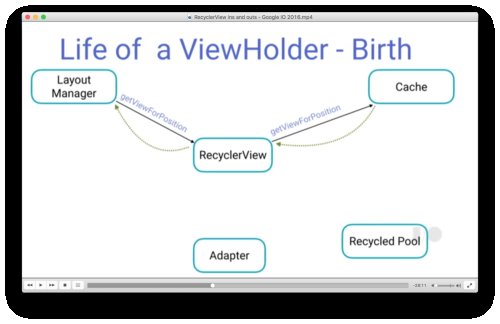
Instead of creating views for every item, RecyclerView reuses existing views to improve performance.
That is why it is called RecyclerView.
Why RecyclerView is Important
Imagine showing a list of 10,000 products.
Without optimization:
This would consume huge memory.
RecyclerView solves this by recycling views.
Example:
RecyclerView creates only 10 views
As user scrolls → views are reused
This makes scrolling smooth and efficient.
Core Components of RecyclerView
RecyclerView works using three main components.
-
RecyclerView
-
Adapter
-
ViewHolder
Sometimes also:
-
LayoutManager
Let’s understand each one.
1. RecyclerView
RecyclerView is the container that displays the list.
Example layout:
android:id="@+id/recyclerView"
android:layout_width="match_parent"
android:layout_height="match_parent"/>
This creates a list container.
2. Adapter
Adapter connects data to the RecyclerView.
Example:
Adapter tells RecyclerView:
-
How many items exist
-
How to create item views
-
How to bind data
3. ViewHolder
ViewHolder holds references to item views.
Example item layout:
Price
Image
Instead of calling findViewById repeatedly, ViewHolder stores references.
This improves performance.
4. LayoutManager
LayoutManager decides how items are displayed.
Common types:
| LayoutManager | Description |
|---|---|
| LinearLayoutManager | Vertical list |
| GridLayoutManager | Grid layout |
| StaggeredGridLayoutManager | Pinterest-style layout |
Example:
Basic RecyclerView Setup
Step 1 – Add RecyclerView in Layout
android:id="@+id/recyclerView"/>
Step 2 – Create Item Layout
Example:
android:id="@+id/productName"
android:text="Product Name"/>
Step 3 – Create Adapter (Kotlin)
RecyclerView.Adapter<ProductAdapter.ViewHolder>() {
class ViewHolder(view: View) : RecyclerView.ViewHolder(view) {
val text = view.findViewById<TextView>(R.id.productName)
}
override fun onCreateViewHolder(parent: ViewGroup, viewType: Int): ViewHolder {
val view = LayoutInflater.from(parent.context)
.inflate(R.layout.item_product, parent, false)
return ViewHolder(view)
}
override fun onBindViewHolder(holder: ViewHolder, position: Int) {
holder.text.text = items[position]
}
override fun getItemCount(): Int {
return items.size
}
}
Step 4 – Attach Adapter
recyclerView.layoutManager = LinearLayoutManager(this)
recyclerView.adapter = ProductAdapter(productList)
Now the list will display.
Java Adapter Example
List<String> items;
public ProductAdapter(List<String> items) {
this.items = items;
}
class ViewHolder extends RecyclerView.ViewHolder {
TextView text;
public ViewHolder(View view) {
super(view);
text = view.findViewById(R.id.productName);
}
}
@Override
public int getItemCount() {
return items.size();
}
}
Java and Kotlin work the same way.
RecyclerView Types
RecyclerView supports multiple layouts.
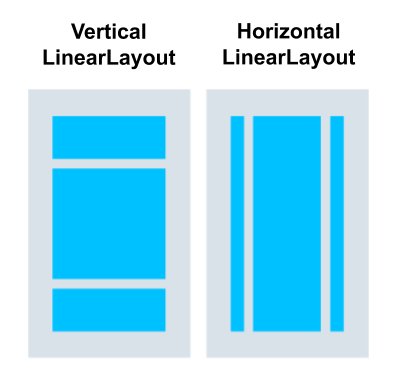
Vertical List
Item 2
Item 3
Item 4
LayoutManager:
Grid Layout
Example:
Item3 Item4
LayoutManager:
Staggered Grid
Example:
Different item heights.
Real Production Example – E-commerce App
Product listing screen:
Product Name
Price
Rating
RecyclerView displays hundreds of products smoothly.
Real Production Example – POS Billing Screen
Billing items:
RecyclerView shows all bill items.
When item added → list updates instantly.
RecyclerView Advantages
Advantages:
-
Better performance than ListView
-
Flexible layout options
-
View recycling improves memory usage
-
Supports animations
-
Supports large datasets
That’s why RecyclerView replaced ListView.
Common Beginner Mistakes
❌ Creating heavy views inside item layout
❌ Not using ViewHolder correctly
❌ Updating entire list unnecessarily
❌ Not using DiffUtil for large lists
Optimizing RecyclerView is important for performance.
Interview-Level Answer
If interviewer asks:
“What is RecyclerView?”
Professional answer:
RecyclerView is a flexible and efficient view for displaying large datasets in Android. It uses Adapter, ViewHolder, and LayoutManager to efficiently reuse views and improve scrolling performance.
Simple Summary
RecyclerView = Efficient list component.
Main parts:
Adapter
ViewHolder
LayoutManager
These work together to display lists efficiently.
Conclusion
RecyclerView is one of the most important UI components in Android development. It enables developers to display large amounts of data efficiently while maintaining smooth performance.
Whether you are building a chat app, social media feed, or POS billing screen, RecyclerView will almost always be part of your UI.
Mastering RecyclerView is essential for becoming a professional Android developer.
Share
What's Your Reaction?
 Like
0
Like
0
 Dislike
0
Dislike
0
 Love
0
Love
0
 Funny
0
Funny
0
 Angry
0
Angry
0
 Sad
0
Sad
0
 Wow
0
Wow
0