Introduction to Android Development – Complete Beginner Guide for Kotlin and Java Developers
Learn Android development from scratch with Kotlin and Java. Understand how Android works, app structure, and how to start building real apps step by step.

Introduction
If you use a smartphone, you already interact with Android apps every day — WhatsApp, Instagram, YouTube, banking apps, POS apps, and many more. But have you ever wondered how these apps are actually built?
Android development is the process of creating applications that run on Android devices like smartphones, tablets, POS machines, TVs, and even smartwatches.
The best part? You don’t need to be an expert to start. With the right understanding and step-by-step approach, anyone can become an Android developer.
This guide will help you understand Android development from the ground up in the simplest way possible.
What is Android?
Android is an operating system created by Google. It is based on the Linux kernel and designed mainly for touchscreen devices.
Think of Android like a bridge between:
-
Hardware (mobile phone)
-
Software (your apps)
Android manages everything like:
-
Memory
-
CPU usage
-
App execution
-
Screen display
-
User input
Without Android, apps cannot run on your device.
What is Android Development?
Android development means creating applications using programming languages and tools provided by Google.
These apps can be:
-
Business apps (POS, CRM, ERP)
-
Social media apps
-
Chat apps
-
Banking apps
-
E-commerce apps
-
Utility apps
Android apps are installed as APK files.
Programming Languages Used in Android
There are two main languages:
1. Kotlin (Recommended)
Kotlin is modern, safer, and officially recommended by Google.
Example:
Why Kotlin is better:
-
Less code
-
Safer (reduces crashes)
-
Modern language
-
Official support by Google
2. Java (Older but Still Used)
Java was the original Android language.
Example:
Many existing apps still use Java.
Tools Required for Android Development
Main tool:
Android Studio
Android Studio is the official IDE for Android development.
It provides:
-
Code editor
-
Emulator (virtual phone)
-
Debugging tools
-
UI design tools
-
Build tools
Everything you need is inside Android Studio.
Basic Android App Structure
When you create an Android project, you will see folders like:
Let’s understand them simply.
java/ folder
Contains your code files.
Example:
This controls app behavior.
res/ folder
Contains UI and design files.
Example:
This controls app appearance.
AndroidManifest.xml
This is the brain of the app.
It tells Android:
-
App name
-
App icon
-
Activities
-
Permissions
Example:
How Android App Actually Works (Simple Explanation)
When user taps your app icon:
Step 1: Android loads your app
Step 2: Android opens MainActivity
Step 3: MainActivity loads UI
Step 4: User interacts with UI
Step 5: Your code responds
This is the basic flow of every Android app.
Core Components of Android App
There are four main components:
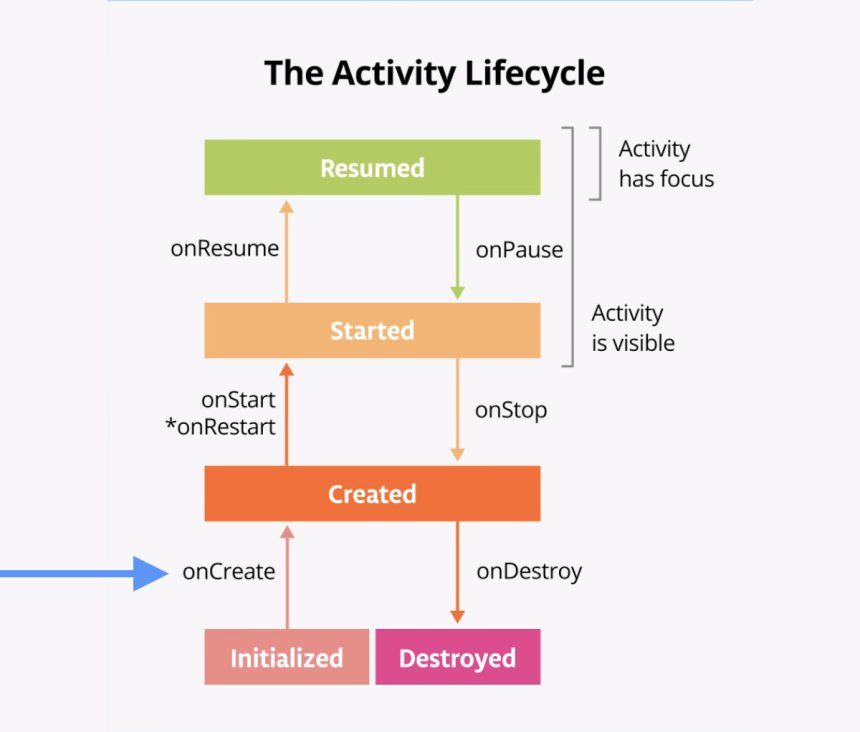
1. Activity
Activity is a screen.
Example:
-
Login screen
-
Dashboard screen
Each screen = Activity
2. Fragment
Fragment is a part of screen.
Example:
-
Tab inside screen
-
Section inside screen
3. Service
Runs in background.
Example:
-
Music playing
-
Data syncing
4. Broadcast Receiver
Listens to system events.
Example:
-
Internet connected
-
Battery low
Real-World Example
Let’s understand using WhatsApp example:
When you open WhatsApp:
-
Activity → Chat screen
-
Fragment → Chat list section
-
Service → Message sync
-
Broadcast Receiver → Internet detection
Everything works together.
Why Android Development is Powerful Skill
Because Android is everywhere:
-
Mobile apps
-
POS machines
-
Smart TVs
-
Smart devices
-
Business systems
Especially if you build POS or offline-first apps, Android is extremely important.
Types of Android Apps You Can Build
You can build:
-
POS apps (like your EasyBillMatic)
-
Chat apps
-
Social media apps
-
E-commerce apps
-
Business apps
-
AI apps
-
SaaS mobile apps
Android development gives unlimited possibilities.
Kotlin vs Java – Which Should You Choose?
Recommendation:
Use Kotlin for new apps.
Use Java only if working on old projects.
Kotlin advantages:
-
Modern
-
Less bugs
-
Easier to write
-
Faster development
Most professional apps now use Kotlin.
What You Will Learn in This Series
In this complete series, you will learn:
-
Android architecture
-
UI design
-
RecyclerView
-
Room database
-
API integration
-
Offline sync architecture
-
MVVM and Clean Architecture
-
Production-level app development
Everything step by step.
Conclusion
Android development may look complex at first, but once you understand the basic structure and flow, everything becomes much easier.
Every large app starts with simple concepts like Activity, UI, and user interaction.
If you learn these fundamentals properly, you can build powerful, scalable, and professional Android apps.
This is just the beginning.
Share
What's Your Reaction?
 Like
0
Like
0
 Dislike
0
Dislike
0
 Love
0
Love
0
 Funny
0
Funny
0
 Angry
0
Angry
0
 Sad
0
Sad
0
 Wow
0
Wow
0