Android Context Explained – Complete Guide for Kotlin and Java Developers
Confused about Android Context? Learn Activity context, Application context, when to use each, and how to avoid memory leaks in Kotlin and Java.

Introduction
If there is one concept that confuses almost every beginner in Android development, it is Context.
You see it everywhere:
-
this -
context -
applicationContext -
requireContext() -
getApplicationContext()
But what exactly is Context?
Why do we need it?
And why does wrong usage cause memory leaks?
Today, we will make Context extremely simple.
What is Context?
Context is a reference to the current state of the application or activity.
In simple words:
👉 Context gives access to system resources and services.
It allows you to:
-
Start an Activity
-
Access resources
-
Show Toast
-
Access SharedPreferences
-
Access database
-
Use system services
Without Context, your app cannot interact with Android system.
Real-Life Analogy
Think of Context like an identity card.
If you want to enter a building, you need ID.
Similarly, if your app wants to access system services, it needs Context.
No Context → No access.
Types of Context in Android
There are mainly two important types:
-
Activity Context
-
Application Context
Let’s understand both clearly.
1. Activity Context
Activity context is tied to a specific Activity.
Example:
Here, this refers to Activity context.
Activity context is destroyed when Activity is destroyed.
Use Activity Context when:
-
Inflating layouts
-
Showing dialogs
-
Navigation
-
UI related operations
Because UI belongs to Activity.
2. Application Context
Application context is tied to the entire application lifecycle.
Example:
or
Application context lives as long as app is running.
Use Application Context when:
-
Accessing database
-
SharedPreferences
-
Long-running tasks
-
Background services
It does not depend on Activity lifecycle.
Activity Context vs Application Context
| Feature | Activity Context | Application Context |
|---|---|---|
| Lifecycle | Until Activity destroyed | Until app closes |
| UI operations | Yes | No |
| Memory leak risk | High (if misused) | Low |
| Safe for long tasks | No | Yes |
Common Example – Toast
Both work:
But:
If you are inside Activity → use this
If inside Adapter → use context passed from Activity
Context Inside Fragment
Inside Fragment:
or
Because Fragment does not directly extend Context.
Wrong usage example:
This will refer to Fragment, not Context.
Real Production Scenario – Memory Leak Example
Wrong approach:
lateinit var context: Context
}
If you store Activity context inside singleton, Activity cannot be garbage collected.
This causes memory leak.
Correct approach:
Store Application context:
Always use Application context for long-living objects.
When to Use What? (Professional Rule)
Use Activity Context when:
-
You need UI
-
You need Theme
-
You need LayoutInflater
-
You need Dialog
Use Application Context when:
-
Database
-
SharedPreferences
-
Background services
-
Singleton classes
Context in Adapter Example
In RecyclerView Adapter:
RecyclerView.Adapter<MyAdapter.ViewHolder>()
Pass context from Activity:
This is correct usage.
Why Context Causes So Much Confusion?
Because:
-
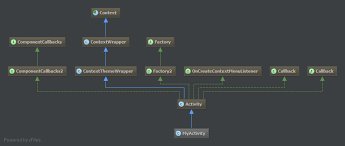
Activity is a Context
-
Application is a Context
-
Service is a Context
All extend Context.
But their lifecycles are different.
That’s where mistakes happen.
Context in MVVM Architecture
Modern apps try to:
Avoid passing context to ViewModel.
Why?
Because ViewModel should not depend on UI.
Correct practice:
-
Use Context only in View (Activity/Fragment)
-
Avoid Context inside ViewModel
This keeps architecture clean.
Most Common Beginner Mistakes
❌ Storing Activity context in static variable
❌ Using wrong context for Dialog
❌ Passing context everywhere unnecessarily
❌ Using context inside ViewModel
Correct approach:
Use context only where necessary.
Interview-Level Answer
If interviewer asks:
“What is Context in Android?”
Professional answer:
Context is an abstract class that provides access to application-specific resources and classes and allows interaction with Android system services. Different types of context have different lifecycles, such as Activity context and Application context.
Simple Summary
Context = Bridge between app and Android system.
Activity Context = UI related.
Application Context = App level operations.
If you remember this rule, you will avoid most errors.
Conclusion
Context may seem confusing at first, but once you understand lifecycle differences, everything becomes logical.
Correct usage of Context prevents:
-
Crashes
-
Memory leaks
-
Bad architecture
Every serious Android developer must understand this concept clearly.
You now understand one of the most confusing but most important Android concepts.
Share
What's Your Reaction?
 Like
0
Like
0
 Dislike
0
Dislike
0
 Love
0
Love
0
 Funny
0
Funny
0
 Angry
0
Angry
0
 Sad
0
Sad
0
 Wow
0
Wow
0