RecyclerView Adapter and ViewHolder Explained – Deep Dive for Kotlin and Java Developers
Understand RecyclerView Adapter and ViewHolder deeply. Learn how RecyclerView binds data efficiently and reuses views in Kotlin and Java.

Introduction
In the previous article, we learned about RecyclerView and how it efficiently displays large lists of data.
But the real magic of RecyclerView happens inside two components:
-
Adapter
-
ViewHolder
These two classes control how data is displayed, reused, and updated on the screen.
If you truly understand Adapter and ViewHolder, you can build advanced UI components like:
-
Chat lists
-
Product catalogs
-
Social media feeds
-
Billing item lists
Let’s break everything down clearly.
RecyclerView Data Flow
RecyclerView does not directly know about your data.
Instead, it uses Adapter to communicate.
Flow:
↓
Adapter
↓
ViewHolder
↓
RecyclerView
↓
Screen
Adapter acts like a bridge between data and UI.
What is RecyclerView Adapter?
Adapter is responsible for:
-
Creating item views
-
Binding data to those views
-
Reporting number of items
Think of Adapter as a manager that controls how data appears in the list.
Three Important Adapter Methods
RecyclerView Adapter mainly uses three methods.
1. onCreateViewHolder()
Creates item layout.
2. onBindViewHolder()
Binds data to item.
3. getItemCount()
Returns number of items.
Let’s understand each one.
1. onCreateViewHolder()
This method creates the item layout.
Example:
val view = LayoutInflater.from(parent.context)
.inflate(R.layout.item_product, parent, false)
return ViewHolder(view)
}
What happens here:
↓
Converted to View
↓
ViewHolder created
RecyclerView creates only few ViewHolders, not for entire list.
2. onBindViewHolder()
This method connects data with UI.
Example:
holder.textView.text = items[position]
}
Example data list:
Banana
Mango
Orange
RecyclerView binds each item to ViewHolder.
3. getItemCount()
Returns number of items.
Example:
return items.size
}
RecyclerView uses this to know how many rows to display.
What is ViewHolder?
ViewHolder stores references to item views.
Example item layout:
Price
Image
Instead of calling findViewById repeatedly, ViewHolder keeps references.
Example:
val name = view.findViewById<TextView>(R.id.productName)
}
This improves performance.
Why ViewHolder Improves Performance
Without ViewHolder:
↓
findViewById called repeatedly
↓
Slow performance
With ViewHolder:
↓
Reused during scroll
↓
Smooth scrolling
This is called ViewHolder Pattern.
Full Adapter Example (Kotlin)
RecyclerView.Adapter<ProductAdapter.ViewHolder>() {
class ViewHolder(view: View) : RecyclerView.ViewHolder(view) {
val text = view.findViewById<TextView>(R.id.productName)
}
override fun onCreateViewHolder(parent: ViewGroup, viewType: Int): ViewHolder {
val view = LayoutInflater.from(parent.context)
.inflate(R.layout.item_product, parent, false)
return ViewHolder(view)
}
override fun onBindViewHolder(holder: ViewHolder, position: Int) {
holder.text.text = items[position]
}
override fun getItemCount(): Int {
return items.size
}
}
Full Adapter Example (Java)
List<String> items;
public ProductAdapter(List<String> items) {
this.items = items;
}
class ViewHolder extends RecyclerView.ViewHolder {
TextView text;
public ViewHolder(View view) {
super(view);
text = view.findViewById(R.id.productName);
}
}
@Override
public void onBindViewHolder(ViewHolder holder, int position) {
holder.text.setText(items.get(position));
}
@Override
public int getItemCount() {
return items.size();
}
}
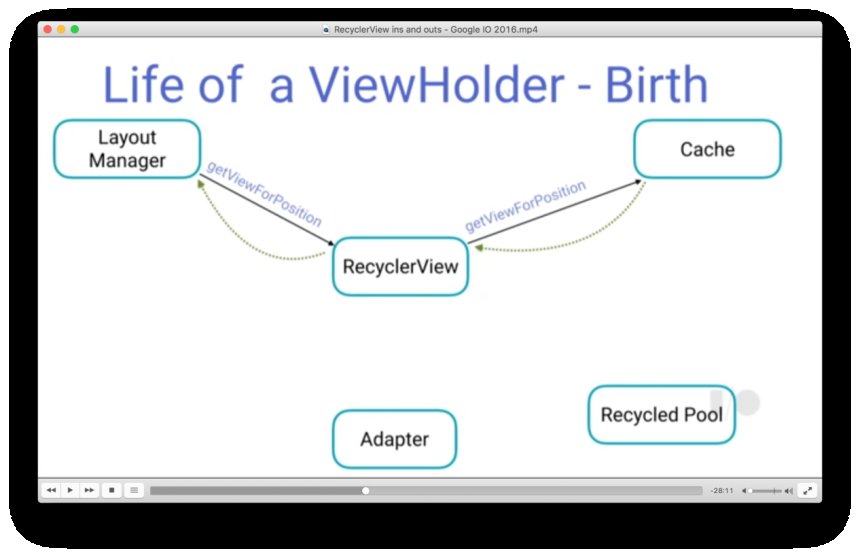
How View Recycling Works
Example:
Phone screen shows 8 items.
RecyclerView creates only 8 ViewHolders.
When you scroll:
↓
ViewHolder reused for Item 9
RecyclerView does not create new views every time.
This is why scrolling remains smooth.
Real Production Example – Chat App
Chat screen:
User2: Hi
User1: How are you?
User2: Fine
RecyclerView Adapter binds messages dynamically.
Each message uses ViewHolder.
Real Production Example – POS Billing
Billing items:
RecyclerView Adapter:
-
Adds new items
-
Updates quantity
-
Updates total
Smooth and efficient.
Updating RecyclerView Data
Example:
Better approach:
notifyItemRemoved()
notifyItemChanged()
These update only specific items.
More efficient.
Advanced Concept – DiffUtil
For large lists, use DiffUtil.
It calculates changes between old list and new list.
Benefits:
-
Faster updates
-
Smooth animations
-
Efficient memory usage
Modern apps use DiffUtil with RecyclerView.
Common Beginner Mistakes
❌ Creating heavy layouts inside item
❌ Using notifyDataSetChanged too often
❌ Forgetting ViewHolder pattern
❌ Updating entire list unnecessarily
Efficient adapters are key to smooth UI.
Interview-Level Answer
If interviewer asks:
“What is ViewHolder in RecyclerView?”
Professional answer:
ViewHolder is a pattern used in RecyclerView to store references to item views, preventing repeated findViewById calls and improving list scrolling performance.
Simple Summary
RecyclerView works using:
↓
Adapter
↓
ViewHolder
↓
UI
Adapter manages data.
ViewHolder stores views.
Conclusion
RecyclerView Adapter and ViewHolder form the backbone of Android list rendering. Understanding how they work internally helps you build efficient and scalable Android apps.
Whether you are building a chat app, e-commerce platform, or POS system, mastering RecyclerView Adapter is essential.
Once you understand this concept, you unlock the ability to build complex and dynamic user interfaces.
Share
What's Your Reaction?
 Like
0
Like
0
 Dislike
0
Dislike
0
 Love
0
Love
0
 Funny
0
Funny
0
 Angry
0
Angry
0
 Sad
0
Sad
0
 Wow
0
Wow
0